Visitors and new arrivals in Korea who want to call a Kakao taxi but have no Korean bank account, or who are unsure whether to install Kakao T or k.ride. Also useful if you want to know what a late cancellation will cost before you tap “Call”.
Quick answer① Install k.ride, Kakao Mobility’s app for international users. It books the same Kakao T taxi fleet with an English interface.
② Sign up with a phone number, email, or SNS account, then register a card or mobile payment. The terms say the service cannot be used until automatic payment is registered.
③ After the ride, the fare is charged to your saved method. Cancel within 1 minute of a driver being assigned to avoid a cancellation fee.
Kakao Mobility’s English homepage for k.ride describes it as the “No.1 taxi app in Korea” for international users, with the interface in English, Simplified Chinese, Traditional Chinese, and Japanese. Destination search and driver chat use automatic translation, so you can type in your own language and the driver reads it in Korean.
The part that trips people up is payment. A ride cannot be requested until a payment method is saved, and a failed charge blocks the account until it is settled. The sections below go through the app choice first, then the setup order, then the fees, so you know where each charge comes from.
Kakao T or k.ride: which app should you install?
Both apps call vehicles from the same Kakao T network. Kakao’s October 2025 announcement says Kakao T Blue, Venti, Black, and Deluxe can be booked through k.ride “with no friction in language, accounts, or payment.” k.ride is the version Kakao Mobility built for people who do not live in Korea.
Here is what the official k.ride pages say on the points that matter to a visitor.
| Point | k.ride (official pages) |
|---|---|
| Made for | International users |
| App language | English, Simplified Chinese, Traditional Chinese, Japanese |
| Sign-up | Phone number, email, or major SNS account |
| Payment | Credit/debit card or mobile payment (Alipay+ logo shown); processed via Eximbay and Kakao Pay |
| Driver chat | Auto-translated chat |
The k.ride site does not list which card brands are accepted, so keep a second card or a mobile wallet ready in case the first one is declined.
Setting up k.ride before your first ride
Do this on Wi-Fi at your hotel or the airport, not at the curb. Card registration is the step most likely to need a retry, and you do not want to be doing it while a driver waits.
Setup order
① Install k.ride from your phone’s app store and open it.
② Sign up with a phone number, email, or SNS account. The app may ask you to verify it.
③ Register a payment method. Without it, the call button cannot be used.
④ Enter your destination. You can type it in your own language.
⑤ Choose the car type, check the estimate, and request the ride.
⑥ Board, ride, and get out. The fare is charged automatically to the saved method.
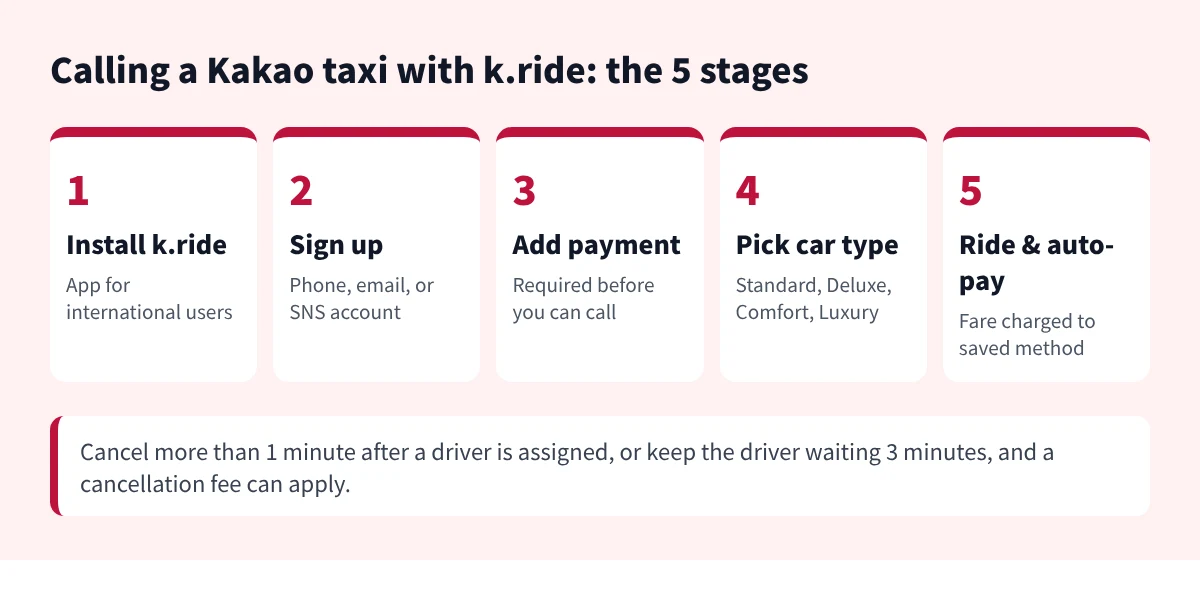
From install to automatic payment. The note at the bottom is the cancellation rule from k.ride’s paid-services page.
The car types appear in the app as Standard, Deluxe, Comfort, and Luxury. On k.ride’s paid-services page, Standard is served by Kakao T Blue partner taxis, Comfort is Kakao T Venti (a minivan with extra space), and Luxury is Kakao T Black. If you travel with large suitcases, Comfort is the one with room for them.
Paying for buses and subways is a separate system. If you also need a transit card, see where to buy a T-money card and how to tap it.
Fares, service fees, and cancellation charges
Taxi fares in Korea run on the meter, and k.ride’s paid-services page says the fare system reported to the local government applies. On top of the fare, the page lists a service fee for each car type. Comfort and Luxury also use a flexible multiplier that changes with demand.
| Car type in app | Fare and fee (immediate call) | Cancellation fee |
|---|---|---|
| Standard (Kakao T Blue partners) | Meter fare + 10% service fee | Set by the partner company’s policy |
| Deluxe | Meter fare + 10% service fee + flexible fee 0–5,000 KRW | 2,000 KRW (+10%) |
| Comfort (Kakao T Venti) | Base 4,000 KRW for 800 m, multiplier 0.8–4.0x, + 10% | 4,000 KRW |
| Luxury (Kakao T Black) | Base 6,000 KRW, multiplier 0.7–4.0x, + 10% | 5,000 KRW |
The cancellation fee applies in three situations listed on the same page: you cancel more than 1 minute after a driver is assigned, the driver cannot reach you after arriving, or you do not board within 3 minutes of the driver’s arrival. Reservations for Comfort and Luxury have their own tiered fees that rise as departure gets closer, so check the screen before booking ahead.
The page also notes that the service fee may change with demand and traffic. Treat the estimate on the booking screen as the figure to check, not the table above.
Before you tap “Call”
☑ Pickup pin is on the correct side of the road
☑ Phone has data so the driver can reach you in chat
☑ You can be at the pin within 3 minutes of arrival
☑ Car type matches your luggage
Korean phrases for the ride
The translated chat covers most messages, but a few short lines help once you are in the car, especially when the drop-off point is a little off.
Useful Korean phrases
카카오 택시 불렀어요. — I called a Kakao taxi.
여기서 내려 주세요. — Please let me out here.
트렁크 좀 열어 주세요. — Could you open the trunk, please?
앱으로 결제했어요. — I paid in the app.
If you need to show an address to the driver, the road-name format is easier to match. See how Korean addresses are written in English.
When the call or payment does not go through
Most failed calls come down to payment. The k.ride terms treat a failed charge as an unpaid fare and restrict the service until it is paid, so a declined card can block the next call as well. Register a second method, or switch to the mobile payment option, and try again.
If it still does not work
• Card rejected at registration: try another card, or a mobile payment option shown in the app.
• Account restricted after a failed payment: settle the unpaid fare in the app first.
• Fare looks wrong: the terms direct fare disputes to the driver or transport provider; system errors or double charges are refunded to the same payment method.
• Nothing works: k.ride’s customer center is in App Menu > Support, 9 AM to 2 AM (KST) Monday to Friday, except public holidays.
• No car assigned: try a different car type, or move the pickup pin to a spot on a main road.
If you lose your phone during the trip, follow the steps to track it and suspend your SIM before anything else.
Taking the subway or bus after your taxi?
👉 Read: T-money card not working fixesLast checked: 2026-11-20
Sources: k.ride official site (Kakao Mobility), k.ride Service Terms and Conditions, k.ride Details of Paid Services, Kakao newsroom, October 1, 2025
Fees and supported payment methods can change. Check the booking screen before you ride.
How this was made: drafted with AI tools and checked against the official sources above.